Google-Extended vs AI Overviews: Which Control Does What
Blocking Google-Extended in robots.txt limits how Google uses your content to train its AI models and to answer questions in Google AI products outside Search, such as the Gemini app. It does not take your site out of AI Overviews or AI Mode, and Google says it has no effect on your Search rankings.
Key Takeaways
- Use Search Console, not Google-Extended, to leave AI Overviews. AI Overviews and AI Mode are part of Search and have their own setting, which Google calls the Search generative AI control.
- Check that setting today. Your site is included by default, so confirm that no one has changed it.
- Review your robots.txt instead of your server logs. Google has no separate Google-Extended crawler, so the setting never appears as a visitor.
- Choose each control by goal. Keep four decisions separate: AI training, Search AI features, single passages and whole pages.
- Avoid treating access as visibility. Allowing a control makes a page eligible. It does not earn a citation, and no setting guarantees one.
- Review our AI Citation Gap study to see which brands AI engines cite in sampled answers.
Checked against Google's documentation in November 2026. Google last updated its controls page on November 24, 2026, and may change these settings again, so confirm the wording on the linked pages before you act.
What is Google-Extended?
Google-Extended is a name you can add to your robots.txt file that tells Google how it may use your content for generative AI outside Search. Google's guide to its generative AI controls says it limits use of your content to train and ground certain commercially available AI products.
Two words in that sentence matter, and Google defines both on the same page.
- Training means teaching a future AI model general language patterns and knowledge before the model is released.
- Grounding means looking up fresh information when someone asks a question, so the answer reflects current pages and can link to them. Google notes that grounding happens after a model is trained and is independent of training.
The token applies to both uses, but only for Google's AI products outside Search. The Gemini app is the example Google gives. Google's overview page for the Google-Extended token, which that guide links to, adds that the token leaves out Search and other Search services.
The same overview page clears up a point many site owners get wrong. Google does not run a separate Google-Extended crawler. When Googlebot or another Google crawler fetches a page, it records whether your robots.txt disallows Google-Extended, and Google's systems apply that choice afterward. So there is no Google-Extended visitor to look for in your server logs, and no extra traffic to block.
Because it sits in robots.txt, the rule can cover your whole site or only certain folders. A site-wide rule looks like this:
User-agent: Google-Extended
Disallow: /
Leaving the rule out means Google-Extended is allowed. Nothing needs to be added to allow it. For a short definition you can share with a colleague, see our Google-Extended glossary entry.
Does blocking Google-Extended remove you from AI Overviews?
No. Blocking Google-Extended does not remove your site from AI Overviews or AI Mode. Those features are part of Google Search, and Google-Extended does not apply to Search. The setting that covers them is the Search generative AI control in Search Console.
This is a common mix-up. A company decides it does not want AI summaries built from its pages, adds a Google-Extended block to robots.txt, and assumes the job is done. Its pages can still appear in AI Overviews, because nothing about Search has changed.
The reverse mistake also happens. A company worries that blocking Google-Extended will hurt its Google rankings, so it avoids a choice it would otherwise make. Google states that Google-Extended status is not used as a ranking signal in Search and does not affect a site's inclusion in Search.
The practical lesson is to decide what you want first, then pick the setting that matches. "Keep my content out of AI training" and "keep my site out of AI Overviews" are separate goals with separate controls.
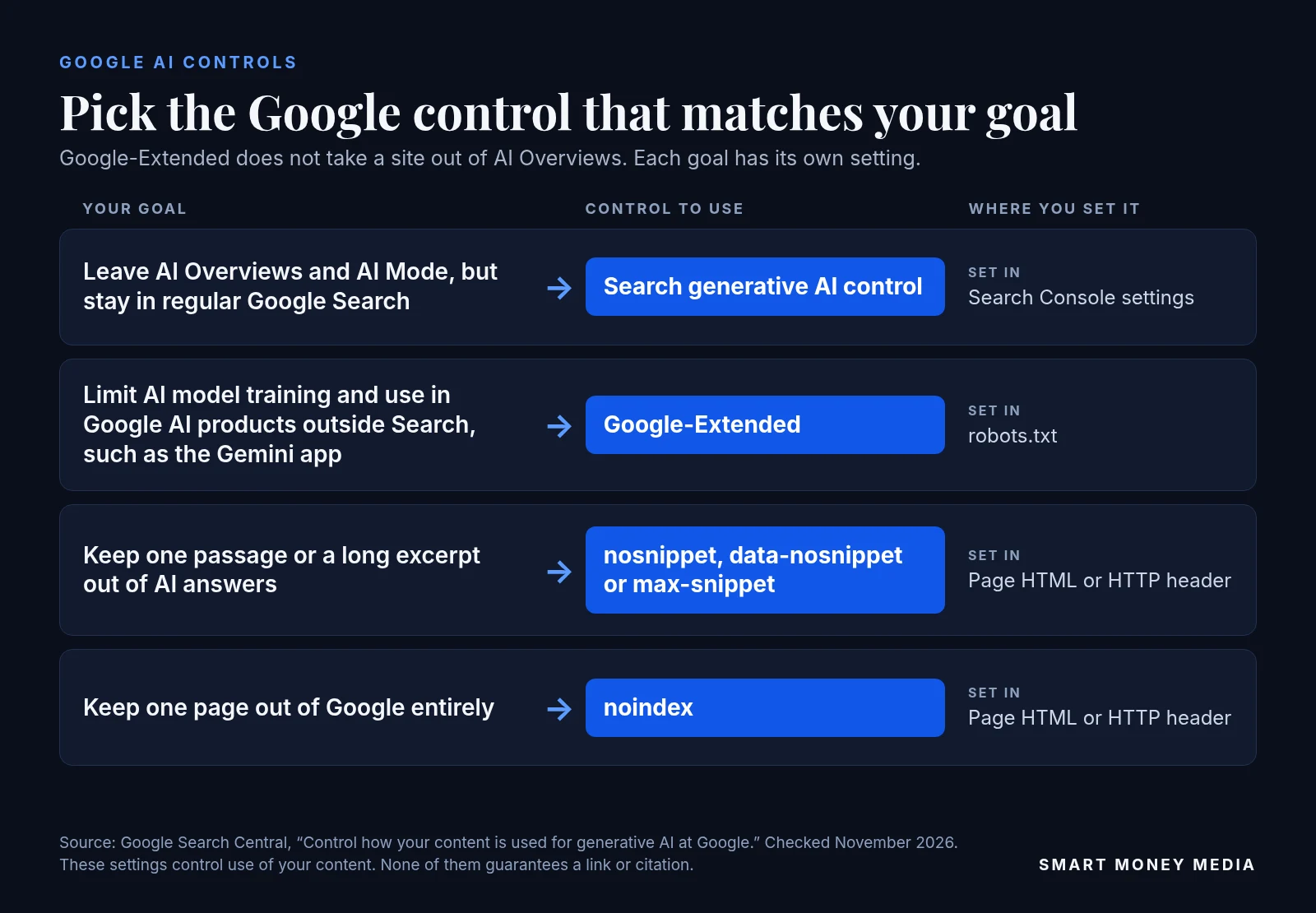
Each goal has its own setting. Source: Google Search Central. None of these settings guarantees a link or citation.
Which Google AI control does what?
Google lists five controls. Each one is set in a different place and changes a different thing. The table below summarizes Google's own descriptions.
| Control | Where you set it | What it changes | What it does not change |
|---|---|---|---|
| Search generative AI control | Search Console settings | Whether your site's content and links are used in AI Overviews, AI Mode and generative AI features in Discover | AI model training. Google says it is not a ranking or inclusion signal for other parts of Search |
| Google-Extended | robots.txt | Use of your content for training and for grounding in certain Google AI products outside Search | AI Overviews and AI Mode. Not a ranking signal and no effect on inclusion in Search |
| GoogleOther | robots.txt | Fetching by Google's generic crawler for non-Search uses such as one-off research and development crawls | Google Search |
| Snippet controls (nosnippet, data-nosnippet, max-snippet) | Page HTML or the X-Robots-Tag HTTP header | How text previews of a page appear in Search, including AI Overviews and AI Mode. nosnippet and max-snippet can also stop content being a direct input for those features | Whether the page is indexed |
| noindex | Page HTML or the X-Robots-Tag HTTP header | Removes the page from Google Search results, including Search AI features | Other pages on your site |
Source: Google Search Central, "Control how your content is used for generative AI at Google."
One more control is on the way. On the same page, Google says it intends to support a shared machine-readable training preference signal in early 2027. Google has not yet published instructions for it, so the five controls above are the ones to use today.
Google also gives examples of how to combine the controls for a specific goal. Six of them are below.
| Your goal | What Google says to do |
|---|---|
| Be available everywhere: Search, AI Overviews, AI Mode, training and other Google AI products | Keep the site open to Googlebot, do not disallow Google-Extended, and leave the Search Console control on include |
| Stay in Search and allow training, but leave AI Overviews and AI Mode | Set the Search Console control to exclude. Do not disallow Google-Extended |
| Stay in Search, including AI Overviews and AI Mode, but limit training and other Google AI products | Disallow Google-Extended in robots.txt |
| Stay in Search, leave AI Overviews and AI Mode, and limit training | Use the Search Console control and disallow Google-Extended |
| Keep one passage or a long excerpt out of AI answers | Add max-snippet, data-nosnippet or nosnippet to the page |
| Keep one page out of Google entirely | Use noindex on that page |
Source: Google Search Central, "Which control should I use?"
For most companies that want to be found, the first row is the right one, and it requires no action. The settings matter when you have a reason to hold something back.
How do you opt out of AI Overviews but stay in Google Search?
Use the Search generative AI control in Google Search Console. Open Settings, choose Search generative AI, and select the exclude option. Your pages stay in regular Google results. This is done in Search Console, not in robots.txt.
Google's Search Console help page describes three choices:
- Include. Your content can appear in these features as links and can help ground the AI response. This is the default for every property.
- Exclude. Your content is not shown in these features, is not linked within them, and is not used to ground their responses.
- Inherit from parent. The property follows the choice made on its parent property. This is the default when a property has a parent.
Before you choose exclude, weigh what Google says happens next.
- You receive no impressions or traffic from those AI features.
- Content from other sites remains available in those features, and Google notes it may appear similar to yours. In plain terms, the answer still gets written, just without you in it.
- Google says the control is not used as a ranking or inclusion signal for other parts of Search.
- It does not affect AI training. Google points to Google-Extended for that.
- Google says a change generally takes a few days to take effect, and some content may take longer because of caching.
This choice suits a business that earns its income from visits to its own pages and has measured that AI summaries reduce those visits. It rarely suits a company that wants buyers to see its name when they research a purchase.
How does Google choose the sources it links in AI answers?
Google says its AI answers start from normal Search results. It looks at ranked results for the question, may run related searches, writes a response from the pages it found, and links the pages that support what the response says.
Google's page on attribution and factuality lays the process out in four steps.
- Results from the Search index. For AI Overviews, Google examines the ranked results for the search and gives snippets from those pages to the model as the basis for the overview.
- Related searches. The model may run one or more related searches to find pages that address different parts of the question. Google calls this query fan-out.
- Grounding and corroboration. The model writes the response from the pages it found, then cites and links the pages that support the information.
- Display. Google's systems choose which supporting links to show and how, balancing relevance and quality signals from Search ranking with a clear layout and a varied set of sources.
Two points follow for a business. First, Google describes these features as tied to its regular ranking and quality systems, so there is no separate door into AI answers. A page has to be indexed and able to show a snippet in ordinary Search to be considered. Second, the related searches in step two mean a page can be considered for a question it was not written to answer word for word. Our query fan-out tool shows the kinds of related questions a topic can branch into.
Google also describes checks that run before a response is shown. It says its systems hold sensitive topics to a higher quality bar and are designed not to show an AI response when it could pose safety risks, violate Search policies or lack reliable consensus. The examples Google gives are sensitive Your Money or Your Life topics and breaking news with limited coverage.
That matters for financial firms, precious metals dealers and other companies in regulated fields. Some of the questions your buyers ask may not produce an AI answer at all, and where one appears, Google says it is checked against a range of reliable sources. Clear sourcing, named expertise and current facts on your own pages are the parts of this you control. None of them guarantees a link.
How Does Your Company Appear in AI Search?
Check how AI assistants and search results describe your company today, and which gaps are worth closing first.
What should a brand that wants to be cited check?
Check that nothing is switched off by accident, then look at the pages themselves. Google's advice comes down to four things: eligibility, helpful and reliable content, accurate and current information, and monitoring.
- Confirm the Search Console control is on include. It is the default, but agencies and former staff sometimes change settings. Look under Settings, then Search generative AI.
- Confirm your important pages are indexed and can show a snippet. Google says only pages that are indexed and eligible to be shown in Search with a snippet can appear as supporting links. A stray noindex or nosnippet tag removes a page from consideration.
- Read your robots.txt. See whether Google-Extended or other AI crawlers are disallowed, and whether that was a decision or an accident. Our free AI Crawler Check reads your robots.txt and reports which AI crawlers it turns away.
- Put the important facts in text. Google advises making sure important information is available in text and helping readers trust it with clear sourcing and background about the author or the site, such as an About page.
- Keep facts current. Google advises fixing factual errors and updating pages when information changes, and warns against changing a page's date unless the content has substantially changed.
- Watch the report. Search Console's Generative AI performance report shows how often links to your site were shown in AI Overviews and AI Mode, and which pages were shown.
Passing these checks makes your pages eligible. It does not make Google choose them. Being chosen depends on how your pages compare with everyone else's for the same question, and on what other credible sites say about you. For a wider view across AI assistants as well as Google, the free AI visibility audit shows how sampled AI answers and search results describe your company, and our guide to reading AI search audit results explains which gaps to work on first.
Improving how often you appear is slow work. Meaningful movement in search and AI visibility commonly takes 6 to 12 months or longer, depending on where you start, how competitive your field is and how platforms change. No one can promise a citation.
What can you do when a Google AI answer gets your company wrong?
Start by finding where the wrong information comes from. If it is on your own site, correct the page. If the AI answer misattributes something, Google says to use the Feedback link below the response. You cannot edit the answer directly.
Google's troubleshooting advice covers four situations.
- The response credits or describes a source inaccurately. Submit feedback using the Feedback link directly below the AI response on the results page.
- The problem is wording on a page you own. Update the page. Google says it picks up the change the next time it crawls the page, and you can ask Google to recrawl it.
- Another site is credited for your content. If you syndicate content, Google suggests asking partners to block indexing of their copies. If a site copied you without permission, Google points to its copyright removal process.
- Part of your page should not be shown. Use nosnippet, data-nosnippet or max-snippet to limit which text can appear.
Google says it reviews feedback to decide whether action is needed or feasible, so sending feedback is not a promise of a correction.
The harder case is wrong or damaging information that sits on someone else's site. Google's controls do not reach it. That work means identifying the source pages, asking for corrections where there are grounds, and publishing accurate information where it can be found. Our article on fixing wrong company information in AI answers walks through that process, and it is the kind of work our reputation management service handles. Removal or correction by a third party is never guaranteed.
How does Google-Extended compare with other AI crawler controls?
Other AI companies also separate training from search, but they do it with separate crawlers that you can name in robots.txt. Google is the exception: Google-Extended is a setting read by its existing crawlers, and its Search AI features are controlled in Search Console.
| Company | Control for search or answers | Control for model training |
|---|---|---|
| Search generative AI control in Search Console, plus snippet controls and noindex | Google-Extended in robots.txt | |
| OpenAI | OAI-SearchBot | GPTBot |
| Perplexity | PerplexityBot | Perplexity says PerplexityBot is not used to crawl content for AI foundation models |
| Anthropic | Claude-SearchBot | ClaudeBot |
Sources: each company's published crawler documentation, linked below.
OpenAI's crawler documentation says OAI-SearchBot is used to surface websites in ChatGPT's search features, GPTBot crawls content that may be used in training, and each setting is independent of the others. Perplexity's crawler page says PerplexityBot is designed to surface and link websites in its search results. Anthropic's help article describes ClaudeBot as collecting content that could contribute to training and Claude-SearchBot as improving search results.
These companies also list separate agents that fetch a page when a user asks for it, and their rules differ, so read each page before you change anything. The common thread is that a blanket rule blocking every AI crawler usually blocks more than the owner intended. Allowing a crawler gives it access. It does not mean the company will mention or link to you. Our LLM SEO guide covers the differences in more depth.
Planning Media Placements and Brand Authority Work?
Our Authority Buildout Program combines media placements, structured data and executive profiles into a six-month-minimum program. Results vary and are never guaranteed.
Should you block Google-Extended?
It depends on what your content is worth to you and how buyers find you. There is no single right answer, and Google documents how to do either.
Reasons a business might block it:
- The content is the product, as with paid research, premium data or subscription journalism, and you do not want it used to train AI models.
- You have licensing or legal reasons to control how your text is reused.
- You want to stay in Google Search and AI Overviews while keeping your content out of other Google AI products. Google documents this exact combination.
Reasons a business might allow it:
- You want your own pages to be available when Google's AI products outside Search look up information.
- Your content exists to be found, as with service pages, guides and company information.
- You have no specific reason to hold it back. Allowing is the default and needs no setup.
One limit applies either way. Google's overview of the token says models may still mention or link to a domain that has disallowed Google-Extended, for example when other websites mention or link to it, and that the block does not stop the same or similar content on other sites from being used. Blocking controls how Google uses your pages. It does not control what is said about you elsewhere.
What these controls cannot do
These settings are permissions. They decide whether Google may use your content in a given way. They are worth getting right, and they are also the smallest part of being visible in AI answers.
- They cannot earn a citation. Allowing access makes a page eligible. Whether it is linked depends on Google's ranking and quality systems.
- They cannot raise your rankings. Google says neither Google-Extended nor the Search generative AI control is used as a ranking signal.
- They cannot correct what other sites say. They apply only to your own pages.
- They cannot be verified by watching for a special crawler. Google-Extended has none. Check your robots.txt and your Search Console settings instead.
- They do not carry over to other AI companies. Each one publishes its own crawler names and rules.
If you are unsure where your site stands, check three things today: the Search generative AI setting in Search Console, your robots.txt file, and any nosnippet or noindex tags on your most important pages. Then decide, on purpose, what you want each one to say.
Produced by the Smart Money Media Team with AI assistance. Read our AI Use Policy.
Frequently Asked Questions
Does blocking Google-Extended remove my site from Google Search?
No. Google states that Google-Extended does not affect a site's inclusion in Google Search and is not used as a ranking signal. It only limits how your content is used for AI model training and for Google AI products outside Search, such as the Gemini app.
Does blocking Google-Extended keep my content out of AI Overviews?
No. AI Overviews and AI Mode are part of Google Search, which Google-Extended does not cover. To leave those features while staying in regular results, use the Search generative AI control in Search Console. Snippet controls and noindex work at the page level.
Is Google-Extended a crawler I can see in my server logs?
No. Google says it does not run a separate Google-Extended crawler. When Googlebot or another Google crawler fetches a page, it records whether your robots.txt disallows Google-Extended, and Google applies that choice afterward. There is no separate visitor to find or block.
How do I opt out of AI Overviews without leaving Google Search?
Open Google Search Console, go to Settings, choose Search generative AI and select the exclude option. Your pages stay in regular Google results. Google says the change generally takes a few days, and some content may take longer because of caching.
Will opting out of AI Overviews hurt my regular Google rankings?
Google says the Search generative AI control is not used as a ranking or inclusion signal for other parts of Search. The cost is different: you receive no impressions or traffic from those AI features, and content from other sites can still appear there.
Can a nosnippet tag keep one passage out of AI Overviews?
Google says nosnippet and max-snippet give you the option to stop content being used as a direct input for AI Overviews and AI Mode. To exclude a single passage rather than a whole page, mark that text with the data-nosnippet attribute.
Does allowing Google-Extended get my brand cited by Gemini?
No. Allowing Google-Extended only makes your content available for those uses. It does not guarantee that Gemini or any other AI product will mention or link to your company. Google's own documentation describes these settings as controls on use, not as a way to earn visibility.
What is the difference between Googlebot and Google-Extended?
Googlebot is the crawler Google uses to fetch pages for Search. Google-Extended is not a crawler. It is a robots.txt name that Google's existing crawlers read to learn whether your content may be used for AI model training and for Google AI products outside Search. Blocking Googlebot affects your presence in Search. Google says blocking Google-Extended does not.
See how AI engines understand, cite, and recommend your brand.
Get your Authority Score, uncover the authority and citation gaps holding your brand back, and see the highest-priority actions to improve them.
Built from live search, AI-answer, citation, backlink, and public-web signals.
Get insights like this in your inbox
Subscribe for weekly PR strategy, media insights, and actionable tips.
Related Articles
ChatGPT Business Directory: How to Claim Your Listing
A step-by-step guide to claiming and verifying your business in ChatGPT's Business Hub, from the DNS TXT record to Persona, with OpenAI's own limits explained.
E-E-A-T for AI Search: The Definitive Guide to Citations
E-E-A-T for AI search determines which brands get cited in generative answers. Learn how to build verifiable trust signals that answer engines reward.
Share of Voice AI Search: How to Track Your Brand Visibility
Understand how share of voice in AI search impacts brand visibility. Learn the metrics, tools, and strategies to measure and improve your presence in generative engines.